
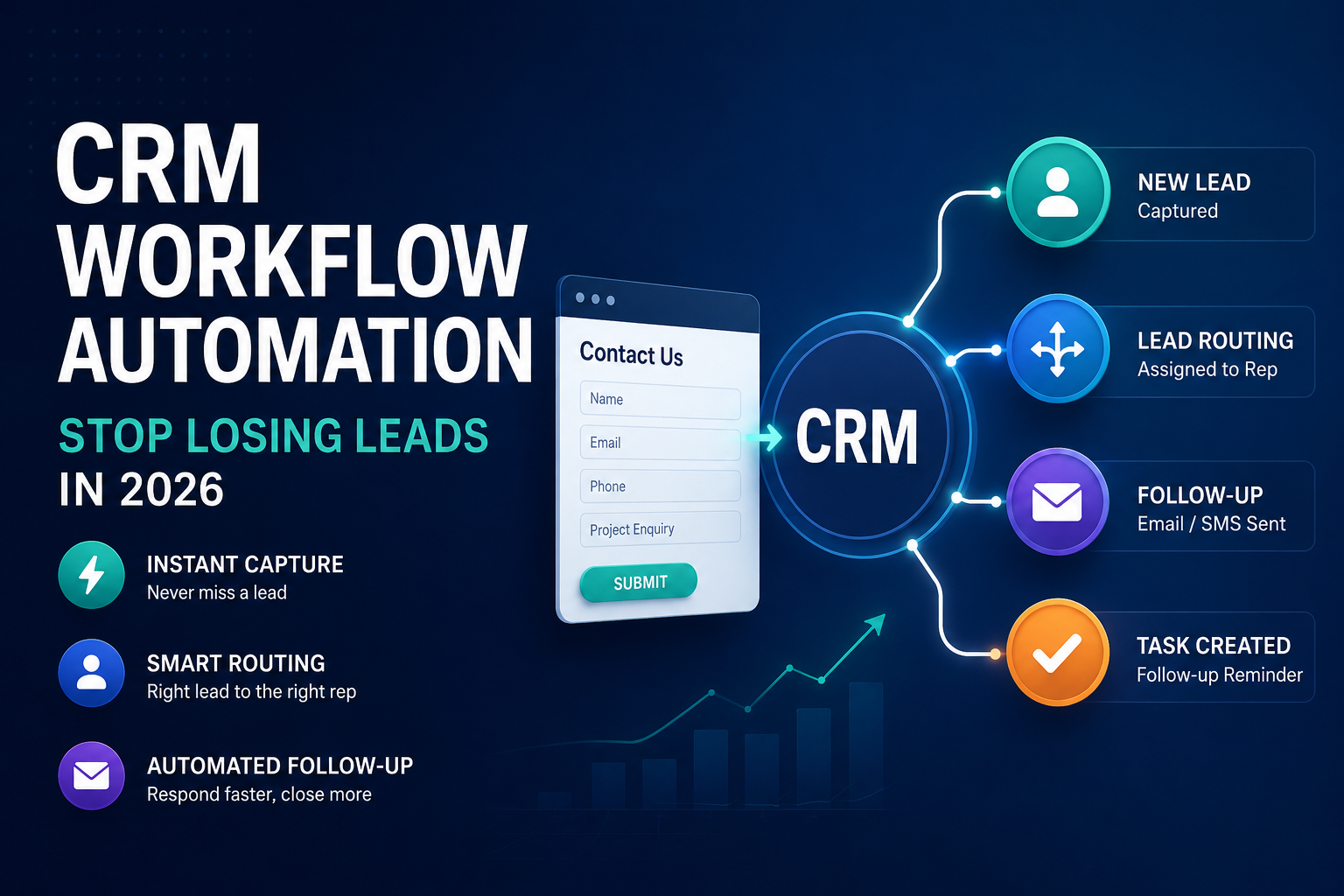
| Key Takeaways CRM workflow automation connects web form automation to CRM lead capture so every enquiry is logged, routed and followed up without manual data entry.Australian businesses using CRM automation report faster response times and fewer dropped leads, though results depend on how clean the underlying process is before automation is applied.Automating a broken process just breaks it faster — map the workflow before you build it.Any automated lead capture form must meet Privacy Act 1988 and Spam Act 2003 consent requirements.Start with one workflow (usually lead capture and first-response) before automating the entire sales pipeline. |
A prospective customer fills out a contact form on your website at 9.47pm on a Tuesday. By the time someone on your team opens it Wednesday afternoon, they have already booked a quote with a competitor. This is the problem CRM workflow automation is built to solve. CRM workflow automation is the practice of connecting your web forms, inbox and customer database so that new enquiries are captured, sorted and actioned automatically, rather than relying on someone to notice, copy and respond manually. For Australian SMEs competing on responsiveness as much as price, the gap between a form submission and a human reply is often the real point of difference. This guide covers what CRM workflow automation actually is, how web form automation and CRM lead capture fit together, what to automate first, and where Australian privacy and spam law set the boundaries.
What Is CRM Workflow Automation?
| CRM workflow automation is the use of rules-based triggers inside a customer relationship management system to automatically capture, sort, assign and follow up on customer and lead activity — replacing manual data entry, lead routing and reminder-setting with predefined “if this, then that” logic. |
In practice, a workflow is built from three parts: a trigger (a web form submission, an email reply, a deal reaching a certain stage), a condition (the lead is from a target suburb, the enquiry mentions a specific service), and an action (create a contact record, assign it to a rep, send a confirmation email, add a task with a due date). Chained together, these rules do the repetitive parts of customer follow-up that used to depend on someone remembering to do them.
It is worth being precise about the difference between marketing automation and CRM workflow automation, because the two terms get used interchangeably. Marketing automation usually governs audience segmentation and email nurture sequences before someone becomes a lead. CRM workflow automation picks up from the moment contact information exists in your database and manages what happens to that person or deal from there — assignment, follow-up, stage changes and internal notifications.
Why This Matters for Australian SMEs Right Now
The scale of CRM adoption has moved past the early-adopter stage. Fortune Business Insights values the global CRM market at roughly US$126 billion in 2026, projected to reach around US$321 billion by 2034, and the Australian CRM software market alone is forecast to pass A$1.67 billion in 2026 — a signal that automated customer management is now baseline infrastructure, not a competitive extra.
The bigger shift is what CRMs are being used for. Industry data from Wave Connect shows 83% of companies now use AI features inside their CRM for tasks like lead scoring and predictive follow-up, and Forrester Research (cited by Amra & Elma) found 71% of B2B companies globally had adopted marketing automation by 2026, with full-suite adopters reporting a 28% reduction in cost-per-lead against 2024 benchmarks.
Time is the other half of the case. Salesforce research puts average seller time spent on non-selling admin at around 60%, and Gartner’s early-2026 survey of 210 chief sales officers found AI-assisted automation saves sellers close to 4.8 hours a week. Neither of those numbers converts to revenue automatically — they only help if the time saved is reinvested into faster follow-up and better conversations, not simply absorbed elsewhere.
“automation applied to an efficient operation will magnify the efficiency” — Bill Gates, Microsoft co-founder
The second half of Gates’s observation is the part most businesses skip: automating a genuinely disorganised process does not fix it — it just produces the same mistakes faster and at greater scale. That is the single biggest reason CRM automation projects underdeliver, and it is why the next section starts with mapping, not tooling.
How CRM Workflow Automation Works: The Core Building Blocks
Web Form Automation
| Web form automation is the connection between a website form and the CRM, so that a form submission instantly creates or updates a contact record instead of arriving only as an email someone has to copy across by hand. |
Most CRMs (HubSpot, Zoho, Pipedrive) offer native form builders or embeddable forms that write directly to a contact record. Where a business runs its forms through a page builder or a separate tool, a middleware connector such as a webhook, Zapier or Make links the two systems. The practical benefit is speed and accuracy: no one is retyping a name, phone number or enquiry details from an email into a spreadsheet, and no submission is missed because an inbox was busy.
CRM Lead Capture
| CRM lead capture is the automatic creation and enrichment of a contact or deal record the moment a new lead interacts with the business — through a form, a call, a chat widget or an ad landing page — so that record becomes the single source of truth for everything that happens with that person afterwards. |
Good lead capture does more than store a name and email. It should tag the source (which form, which campaign, which page), timestamp the first interaction, and apply any available enrichment (company size, location, service interest) so the sales team has context before the first call. Duplicate-checking matters here too — without it, the same person filling out two different forms creates two competing records, which is one of the most common causes of a CRM nobody trusts.
Lead Routing and Scoring
Once a lead exists in the CRM, routing rules decide who owns it. Simple routing assigns by territory, service line or round-robin; more advanced setups use lead scoring — assigning points for behaviours like page visits, form completions or email opens — to flag which leads are ready for a call versus which need more nurturing first. For most SMEs, starting with simple, transparent routing rules beats a complex scoring model that no one on the team fully understands.
Automated Follow-Up Sequences
The highest-value automation for many small businesses is the simplest: an instant acknowledgement email or SMS the moment a form is submitted, followed by a task reminder for a human to make contact within an agreed window. This does not replace a genuine conversation — it buys the time to have one before the lead moves on to a competitor.
CRM Workflow Automation vs Manual Processes
| Factor | Manual process | CRM workflow automation |
| Data entry | Copied by hand from email/form into CRM or spreadsheet | Captured automatically at point of submission |
| Response time | Depends on when staff check enquiries | Instant acknowledgement, prompt task for follow-up |
| Lead assignment | Ad hoc, often first-in-inbox | Rule-based routing by territory, service or availability |
| Consistency | Varies by staff member and workload | Same sequence applied every time |
| Reporting | Manually compiled, often out of date | Live pipeline and source-of-lead reporting |
| Risk of dropped leads | Higher, especially outside business hours | Lower, but only if the workflow is well designed |
Step-by-Step: Building Your First CRM Workflow Automation
Every important heading in this section answers the practical “how” question SME owners ask before they touch any software.
1. Map the current process first
Write down exactly what happens today from form submission to first contact, including every manual step and who does it. This becomes the workflow you automate — not a guess at what it should be.
2. Pick one workflow to start with
Lead capture and first-response is almost always the highest-value starting point. Resist automating the entire pipeline in one go.
3. Choose where the trigger lives
Decide whether the website form will write directly into the CRM, or route through a connector like a webhook or Zapier. Native integrations are more reliable than third-party connectors where available.
4. Set the conditions
Define what should happen differently for different leads — by service, location or urgency — so the workflow does not treat every enquiry identically.
5. Build the actions
Configure the record creation, the internal notification, the owner assignment and the acknowledgement message. Keep the first version simple enough to troubleshoot.
6. Test with real submissions
Submit test enquiries covering the edge cases — duplicate contacts, incomplete forms, out-of-hours submissions — before switching the workflow on for live traffic.
7. Review after 30 days
Check response times, duplicate rates and whether staff are actually using the assigned tasks. Adjust the rules based on what the data shows, not on assumptions.
Common Mistakes to Avoid
- Automating before mapping the process, which usually just speeds up an existing bottleneck.
- Skipping duplicate-detection rules, leading to the same lead being contacted twice by two different reps.
- Building overly complex scoring models before the team trusts basic routing.
- Leaving old, unautomated forms live on the website alongside the new automated one.
- Treating the acknowledgement email as the whole follow-up, instead of a bridge to a human conversation.
- Not assigning an owner for workflow maintenance, so broken automations go unnoticed for months.
Compliance: Privacy and Spam Rules for Automated Lead Capture
| Any Australian business automating web form or CRM lead capture needs express or properly inferred consent before sending marketing messages, in line with the Spam Act 2003 (Cth), and must handle the personal information it collects in line with the Australian Privacy Principles under the Privacy Act 1988 (Cth). |
This is the section most generic CRM automation guides skip, because most are written for the US or UK market. Under the Spam Act 2003 (Cth), enforced by the Australian Communications and Media Authority, a business needs consent before sending a commercial electronic message, and every automated message triggered by a workflow — including a form-confirmation email that promotes services — needs a working unsubscribe option. Consent can be express (a clear opt-in tick box, unticked by default) or, in narrow circumstances, inferred from an existing relevant relationship; a one-off enquiry does not automatically create ongoing consent to market to that person.
Separately, the personal information a CRM workflow captures — name, phone number, email, enquiry details — is regulated under the Australian Privacy Principles administered by the Office of the Australian Information Commissioner. Businesses should be able to say clearly what data a workflow collects, why, and how long it is retained, and should build that into the automation design rather than treating it as an afterthought.
Choosing the Right CRM for Workflow Automation
Most SME-suitable CRMs — HubSpot, Zoho, Pipedrive and similar platforms — now include native workflow builders, so the deciding factor is rarely raw automation capability. What matters more for an Australian SME is:
- Native form-to-CRM integration, or a documented, low-maintenance connector.
- Clear, visual workflow builders your team can actually maintain without a developer.
- Support for Australian data-handling requirements and clear data-retention controls.
- Reporting that shows lead source, response time and conversion by workflow.
- Pricing that scales with contact volume rather than jumping in large tiers.
A useful test before signing up: ask the vendor to demonstrate the exact workflow described in the step-by-step section above, using your own website form, during the sales demo. If it takes more than one meeting to show, it is probably too complex for a first automation.
An Illustrative Example
To make this concrete: a trades or professional-services business receiving 15 web enquiries a week, currently checked once a day, typically loses a meaningful share of those leads to whichever competitor replies first. Moving to an automated workflow — instant acknowledgement, automatic assignment, a same-day task reminder — shortens that gap from hours to minutes without adding headcount. This is illustrative of the pattern automation addresses, not a reported case study; actual results depend on lead volume, industry and how promptly staff act on the tasks the workflow creates.
“The purpose of business is to create and keep a customer.” — Peter Drucker, management consultant and author
CRM workflow automation does not replace that relationship — it protects the moments where relationships are usually lost: the unanswered form, the lead nobody owned, the follow-up nobody remembered to send.
Frequently Asked Questions
What is CRM workflow automation?
CRM workflow automation is the use of trigger-based rules inside a CRM to automatically capture, assign and follow up on leads and customer records, replacing manual data entry and reminder-setting.
How does web form automation connect to a CRM?
A website form is linked to the CRM either through a native integration or a connector such as a webhook, Zapier or Make, so each submission creates or updates a contact record automatically.
Is CRM workflow automation worth it for a small business?
It is most worthwhile once a business is missing or delaying follow-up on enquiries; the value comes from faster, more consistent response, not from complexity.
What should I automate first?
Lead capture and first-response follow-up almost always deliver the fastest, clearest return before attempting to automate an entire sales pipeline.
Does automated lead capture need consent under Australian law?
Yes. Any commercial electronic message triggered by a workflow needs consent under the Spam Act 2003, and personal information collected must be handled under the Australian Privacy Principles.
Which CRMs support workflow automation in Australia?
HubSpot, Zoho CRM, Pipedrive and Salesforce all include native workflow builders suitable for SME use, differing mainly in pricing and ease of setup.
How much does CRM workflow automation cost?
Cost varies by platform and contact volume; many CRMs offer usable automation features from free or low-cost tiers, with pricing scaling as contact numbers and complexity grow.
Can CRM automation replace a salesperson?
No. It removes repetitive data entry and follow-up reminders so the salesperson can spend more time on the conversation itself, not the admin around it.
What is the difference between lead scoring and lead routing?
Lead routing decides who owns a new lead; lead scoring ranks how sales-ready that lead is based on their behaviour, so teams can prioritise who to contact first.
How long does it take to set up a first CRM workflow?
A single, well-scoped workflow such as lead capture and acknowledgement can typically be built and tested within days, though timelines depend on the CRM and existing form setup.
A Note Before You Automate
If your website forms and CRM aren’t talking to each other yet, that gap is usually the highest-leverage fix available — well ahead of any wider automation project. Pulse Reach Digital’s conversion rate optimisation and web development work looks at exactly this handoff — where a lead is lost between the form and the follow-up — alongside the analytics and reporting needed to see whether a workflow is actually working. If it’s time for a second look at your enquiry process, get in touch for a straightforward conversation about what’s realistic for your setup.




0 Comments