
Key Takeaways
A WordPress website should do more than look good. It should be easy for customers to use, simple for your team to manage and flexible enough to grow with the business. That might mean a custom theme, WooCommerce, a few carefully chosen plugins, better page speed or a complete migration from another platform. For Australian businesses, good WordPress development also needs to consider mobile users, SEO, security, accessibility and ongoing maintenance.
Your website is often the first place a potential customer goes after hearing about your business.
They might find you through Google.
They might click a social media post.
They might get your business name from a referral.
Whatever brought them there, the website has a job to do.
It needs to answer their questions quickly and make the next step obvious.
That could mean calling you, requesting a quote, booking an appointment or buying a product.
This is where WordPress website development becomes more than choosing a theme and adding your logo.
A properly developed WordPress website gives you control over the design, content, functionality and future growth of the site.
It can also make your marketing work harder.
But there is a catch.
WordPress itself does not guarantee a fast, secure or successful website.
The way it is planned and built matters.
“Design is not just what it looks like and feels like. Design is how it works.” — Steve Jobs
That is a useful way to think about business websites.
A website can look impressive and still be frustrating to use.
A better approach is to start with what your customers need and then build the website around that.
What Is WordPress Website Development?
WordPress website development covers the planning, design, development and ongoing improvement of a website built with WordPress.
That can be a relatively simple business website.
It can also be a much more involved project with custom functionality, WooCommerce, third-party integrations and custom content structures.
For a small Australian business, the project might include:
- Designing the main pages
- Creating service or product templates
- Setting up contact forms
- Connecting analytics
- Improving mobile usability
- Setting up basic SEO
- Optimising images
- Securing the website
A larger project could involve:
- Custom WordPress themes
- Custom plugins
- WooCommerce
- CRM integrations
- Booking systems
- Membership areas
- API connections
- Advanced search
- Customer portals
- Website migration
So when someone says they need a “WordPress website”, there is still an important question to answer:
What does the website actually need to do?
That question usually determines the development approach.
Why WordPress Is Popular With Australian Businesses
One reason businesses choose WordPress is flexibility.
You can start with a relatively straightforward website and expand it later.
For example, a business might begin with five pages:
- Home
- About
- Services
- Blog
- Contact
A year later, it may need a booking system, new service pages, a resource centre or an online shop.
WordPress can accommodate those changes.
The platform also gives businesses a large ecosystem of themes, plugins, developers and integrations.
Australian Government guidance notes that self-hosted content management systems can offer flexibility and customisation, although they also require more responsibility for maintenance and updates. Business.gov.au and website guidance .
That last point is worth remembering.
WordPress gives you control.
With control comes responsibility.
You need to keep the website maintained, secure and compatible with the software around it.
Should You Use a Custom WordPress Website?
It depends on what you are trying to build.
A custom website makes more sense when your business has requirements that a standard theme cannot handle well.
For example, you may need a particular customer journey.
Perhaps customers need to answer several questions before requesting a quote.
Or maybe your website needs to connect with your CRM.
You might have a complicated product catalogue.
You could also have a very specific brand experience that does not fit neatly into a pre-built theme.
In those situations, custom WordPress development can be worthwhile.
Custom development can give you more control over:
- Page layouts
- Navigation
- Content structures
- User journeys
- Forms
- Integrations
- WooCommerce functionality
- Performance
- Future development
That does not mean every business needs a completely custom website.
A small local business with straightforward requirements may be perfectly well served by a quality existing theme.
The mistake is assuming that “custom” automatically means “better”.
It does not.
The better option is the one that solves the business problem without adding unnecessary complexity.
Custom WordPress Theme or Ready-Made Theme?
This is one of the first decisions many businesses face.
A ready-made theme can get a website online quickly.
You have an existing design.
You customise the colours, fonts, images and content.
That can work well for a smaller project.
The problem starts when you try to make the theme do things it was never designed to do.
You may end up adding plugins, custom CSS and workarounds.
Eventually, simple changes become difficult.
A custom theme takes more planning at the beginning.
But it can be built around your actual content and customer journey.
| Consideration | Ready-made theme | Custom theme |
|---|---|---|
| Initial setup | Usually quicker | More planning |
| Design flexibility | Moderate | High |
| Custom layouts | May be limited | Flexible |
| Unique functionality | May require workarounds | Can be built around requirements |
| Development cost | Often lower | Usually higher |
| Long-term flexibility | Depends on the theme | Generally greater |
| Best fit | Simpler websites | Bespoke requirements |
A practical rule: If you keep fighting the theme, it may be time to stop customising it and reconsider the development approach.
What About Custom WordPress Functionality?
Sometimes a website needs to do something that a standard WordPress installation cannot handle.
That is where custom functionality comes in.
Imagine you run a service business.
A customer enters their suburb, chooses a service and answers a few questions.
The website then sends the right information to your sales team.
That is not simply a page design problem.
It is a functionality problem.
Other examples include:
- Quote calculators
- Booking systems
- Customer dashboards
- Membership areas
- Advanced forms
- Custom search
- CRM integrations
- Inventory connections
- Automated emails
- Third-party APIs
- Custom reporting
A good developer will first look at the simplest reliable way to achieve the result.
Sometimes an established plugin is enough.
Sometimes custom development makes more sense.
There is no prize for having the most code on your website.
WooCommerce Integration for Australian Businesses
If you want to sell products online, WooCommerce is one of the most common options within the WordPress ecosystem.
WooCommerce is an open-source eCommerce platform built on WordPress. Its official documentation covers products, orders, payments, shipping, extensions and store management. urlWooCommerce documentationhttps://woocommerce.com/documentation/woocommerce/
A basic store may need:
- Product pages
- Categories
- Shopping cart
- Checkout
- Customer accounts
- Payment processing
- Shipping
- Order management
But many businesses need more.
For example, an Australian retailer may need different shipping rules for different locations.
A wholesaler may need customer-specific pricing.
A service business might sell bookings rather than physical products.
A larger store may need inventory or accounting integrations.
That is where WooCommerce development can become more involved.
Before building a WooCommerce store, think about:
- What are you selling?
- How many products will you have?
- Do products have variations?
- How will customers pay?
- How will orders be fulfilled?
- How will shipping work?
- What information does the business need from customers?
- Does WooCommerce need to connect with another system?
Sorting these questions out early can save a lot of rework later.
WordPress Speed Optimisation
Nobody likes waiting for a website to load.
This is especially noticeable on mobile devices.
A visitor might be sitting on a train, standing in a queue or using a mobile connection while looking for your business.
If the page takes too long to become useful, they may simply leave.
WordPress speed optimisation can involve many different things.
For example:
- Compressing images
- Using modern image formats
- Improving caching
- Removing unnecessary plugins
- Reducing JavaScript
- Optimising CSS
- Improving database performance
- Reviewing hosting
- Reducing third-party scripts
- Optimising fonts
Google’s Core Web Vitals focus on loading performance, responsiveness and visual stability. The current recommended thresholds include LCP of 2.5 seconds or less, INP below 200 milliseconds and CLS below 0.1. urlGoogle Core Web Vitals documentationhttps://developers.google.com/search/docs/appearance/core-web-vitals
But there is an important distinction.
Do not optimise your website just to make a testing tool display a high score.
A website can have a good lab score and still feel awkward to a real customer.
Look at both.
Test the technical performance.
Then use the website yourself.
Try it on a phone.
Open the menu.
Submit a form.
Find a service.
Add a product to the cart.
Real user experience matters.
WordPress Security Hardening
Security is easy to ignore when everything is working.
Then something goes wrong.
A plugin vulnerability.
A compromised password.
An outdated theme.
A suspicious administrator account.
A website backup that does not actually work.
WordPress security hardening is about reducing these risks.
It can include:
- Keeping WordPress updated
- Updating themes and plugins
- Removing unused software
- Using strong passwords
- Enabling two-factor authentication
- Limiting administrator access
- Using HTTPS
- Maintaining backups
- Monitoring for suspicious activity
- Using reputable hosting
- Reviewing user permissions
WordPress recommends keeping WordPress core, themes and plugins updated and using software that is actively maintained. urlWordPress security guidancehttps://developer.wordpress.org/advanced-administration/security/
Security is also not a one-off task.
A website that was secure when it launched still needs attention six months later.
That is why maintenance matters.
When Do You Need a Custom WordPress Plugin?
Plugins are one of the reasons WordPress is so flexible.
There are plugins for forms, SEO, backups, eCommerce, memberships, analytics and countless other tasks.
But installing a plugin for every small requirement can create problems.
You may end up with:
- Too many plugins
- Conflicting functionality
- More updates
- More security risks
- Slower administration
- Difficult troubleshooting
Sometimes the cleaner option is a small custom plugin.
For example, a business might have an internal process that does not exist in an off-the-shelf plugin.
A developer can build that functionality specifically for the business.
The key is not to build custom software simply because you can.
First ask:
Is there a reliable existing solution?
If there is, use it when it makes sense.
If not, custom development may be the better option.
WordPress Website Migration
Moving a website is one of those jobs that can look easy from the outside.
It is not always easy.
You are not just moving pages and images.
You may also need to protect:
- URLs
- Search rankings
- Metadata
- Images
- Internal links
- Forms
- Analytics
- Redirects
- Customer data
- eCommerce functionality
Imagine a page has been ranking well in Google for several years.
You launch a new website.
But the old URL disappears.
There is no redirect.
The new page has a different URL.
That can create an unnecessary problem.
A proper migration should therefore include a URL mapping and redirect plan.
A sensible migration process looks something like this:
- Audit the existing website.
- Back up the website.
- Record important URLs.
- Map old URLs to new URLs.
- Move content and media.
- Rebuild required functionality.
- Test forms and integrations.
- Check internal links.
- Implement redirects.
- Test the new website.
- Check Search Console.
- Monitor the site after launch.
This is especially important for established businesses with significant organic traffic.
Ongoing WordPress Website Maintenance
Launching the website is not the end.
It is the beginning of the maintenance phase.
WordPress core gets updated.
Plugins change.
Browsers change.
Hosting environments change.
Security threats change.
Your business changes too.
You may add new services or products.
You may change your pricing.
You may create new landing pages.
You may need new integrations.
Regular maintenance can include:
- WordPress updates
- Plugin updates
- Theme updates
- Backups
- Security monitoring
- Performance checks
- Broken-link checks
- Form testing
- Database maintenance
- Technical SEO checks
The WordPress documentation also provides ongoing guidance around maintenance, security and performance. urlWordPress documentationhttps://wordpress.org/documentation/
A small amount of regular attention is usually easier than trying to fix a neglected website all at once.
How Much Does WordPress Website Development Cost in Australia?
There is no useful single answer.
A five-page brochure website and a custom WooCommerce platform are both “WordPress websites”.
They are not comparable projects.
The cost can depend on:
- Number of pages
- Design requirements
- Custom development
- Content migration
- WooCommerce
- Integrations
- SEO requirements
- Forms and booking systems
- Photography and content
- Hosting
- Testing
- Ongoing maintenance
You will see Australian providers quoting very different figures because their project scopes are different.
So instead of asking only:
“How much does a WordPress website cost?”
Ask:
“What do I actually need the website to do?”
That gives a developer something useful to estimate.
How Long Does It Take to Build a WordPress Website?
Again, it depends on the project.
A straightforward business website can be completed much faster than a custom eCommerce platform.
The biggest delays are often not caused by development.
They come from decisions.
Content is not ready.
The sitemap keeps changing.
The design is approved and then changed.
A third-party integration is delayed.
The client has not decided which products belong in the store.
Clear planning helps.
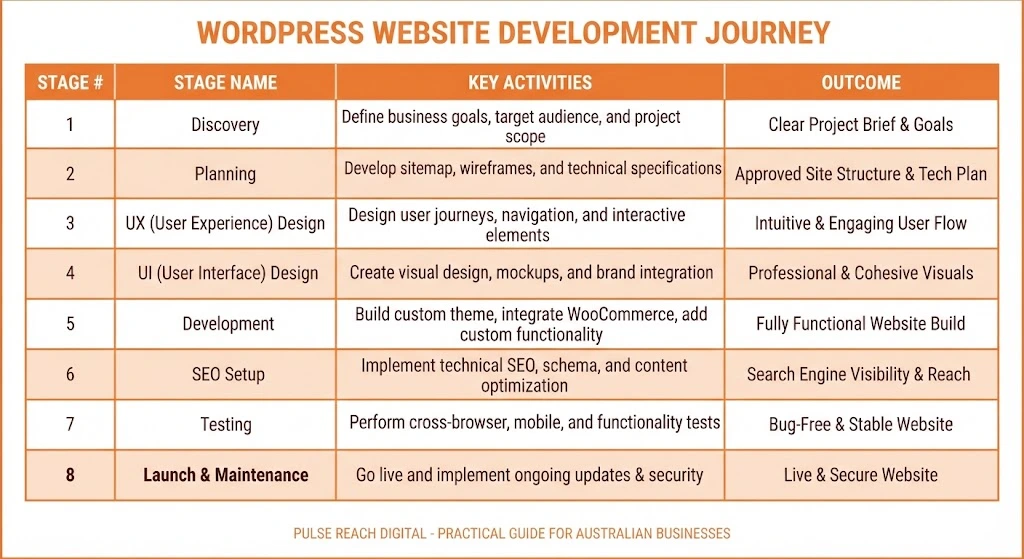
A typical project might move through:
Discovery → Planning → Design → Development → Content → Testing → Launch
For a larger project, these stages may overlap.
The important thing is to agree on the scope before development begins.
WordPress Development and SEO Should Start Together
One of the biggest mistakes is building the website first and thinking about SEO later.
By then, important decisions have already been made.
The URL structure exists.
The navigation exists.
The templates exist.
The content hierarchy exists.
Changing everything later can be expensive.
SEO should be considered while the website is being planned.
That includes:
- Website architecture
- URL structure
- Internal linking
- Heading structure
- Mobile experience
- Page speed
- Indexation
- Canonical URLs
- XML sitemap
- Structured data
- Image optimisation
- Content structure
Google’s Search Essentials recommends making content accessible to search engines and creating helpful, people-first content. urlGoogle Search Essentialshttps://developers.google.com/search/docs/essentials
This is also where development and content need to work together.
A developer can create a technically accessible website.
But the content still needs to answer the customer’s question.
You need both.
Can WordPress Support AI Search and AEO?
Yes, but there is no special “AI SEO plugin” that guarantees your website will appear in AI answers.
The fundamentals still matter.
Google’s guidance for AI features focuses on familiar search fundamentals, including crawlability, helpful content and good page experience. urlGoogle’s guidance on AI features and your websitehttps://developers.google.com/search/docs/fundamentals/ai-optimization-guide
For WordPress, that means making your information easy to understand.
For example, instead of hiding an important answer inside a long paragraph, answer the question directly.
Instead of creating vague service pages, explain exactly what you offer.
Instead of writing content only for keywords, answer the questions your customers actually ask.
Good AEO-friendly content often includes:
- Direct answers
- Clear headings
- Short explanations
- Useful lists
- Comparison tables
- Definitions
- Examples
- FAQs
- Supporting evidence
- Relevant internal links
The same content can then serve traditional search, AI search and human visitors.
That is the real advantage.
Accessibility Should Be Part of Development
Accessibility is sometimes treated as an optional extra.
It should not be.
A website should be usable by as many people as reasonably possible.
That includes people who:
- Use screen readers
- Navigate with a keyboard
- Have visual impairments
- Have motor difficulties
- Need larger text
- Benefit from clear and predictable navigation
Some simple improvements include:
- Proper heading structure
- Descriptive link text
- Useful image alt text
- Keyboard-friendly navigation
- Clearly labelled forms
- Good colour contrast
- Visible focus states
Australian Government guidance also recommends considering accessibility when creating a business website and points businesses towards the W3C Web Accessibility Initiative. urlBusiness.gov.au website guidancehttps://business.gov.au/online-and-digital/business-website/set-up-a-business-website
Accessibility is good practice.
It can also make the website easier for everyone to use.
Common WordPress Mistakes I Would Avoid
Installing a plugin for everything
Every plugin adds another piece of software to maintain.
Use plugins because they solve a real problem.
Not because they look useful.
Choosing the cheapest developer
A low upfront price can become expensive if the website is poorly built.
Look at the quality of the work.
Ask what is included.
Designing before understanding the customer
Pretty pages do not automatically create conversions.
Work out what customers need first.
Ignoring mobile users
A large percentage of your visitors may be using a phone.
Test the actual mobile experience.
Treating SEO as an afterthought
Changing a website’s structure after launch can create unnecessary work.
Plan SEO early.
Forgetting about maintenance
Your website will not stay unchanged.
It needs attention.
Chasing a perfect PageSpeed score
Performance matters.
But the customer experience matters more than a number on a testing tool.
How to Choose a WordPress Development Partner
Do not judge a developer only by the screenshots in their portfolio.
Ask questions.
A good WordPress development partner should be able to explain why they recommend a particular approach.
Ask:
- Will you use a custom or existing theme?
- Which plugins do you recommend?
- Why are they needed?
- How will you handle website security?
- How will you test performance?
- What happens during a migration?
- How will SEO be protected?
- Who owns the website?
- Can our team edit the content?
- What happens after launch?
- Is ongoing maintenance available?
Pay attention to the answers.
If everything comes back to “we’ll install a plugin”, ask more questions.
If everything requires expensive custom development, ask more questions too.
You want someone who understands the balance.
What Should a Good WordPress Website Do?
At the end of the day, the technology is only part of the equation.
A good business website should make it easy for someone to:
Understand → Trust → Act
They should understand what you do.
They should find reasons to trust you.
Then they should know what to do next.
That might be:
Call us
Request a quote
Book a consultation
Buy now
Send an enquiry
If visitors have to hunt for the next step, the website is making things harder than necessary.
Final Thoughts
WordPress is not automatically the right solution for every business.
But when the requirements fit, it can be a very capable platform.
The real difference comes from how the website is planned and developed.
A good WordPress project considers the whole picture:
- Business goals
- Customer experience
- Design
- Content
- SEO
- Performance
- Security
- Accessibility
- Integrations
- Maintenance
You do not necessarily need the most complicated website.
You need the right website for your business.
If you are planning a new website, rebuilding an existing one or moving away from another platform, it is worth sorting out the requirements before choosing the theme or starting development.
And if organic visibility is part of the plan, bring SEO into that conversation from day one.
For businesses looking to connect website development with a broader search strategy, you can explore Pulse Reach Digital’s SEO services.
FAQ
What is WordPress website development?
WordPress website development involves planning, designing, building and maintaining a website using WordPress. It can include custom themes, functionality, plugins, WooCommerce, integrations, performance and security.
How much does WordPress website development cost in Australia?
There is no fixed price. Costs depend on the website’s size, design, functionality, integrations, eCommerce requirements, content and development work.
How long does it take to build a WordPress website?
A straightforward business website may take several weeks. Larger projects involving custom functionality, WooCommerce or migration can take considerably longer.
Is WordPress good for Australian businesses?
Yes. WordPress can be suitable for Australian businesses that need a flexible content management system, custom functionality, content marketing or eCommerce.
What is a custom WordPress theme?
A custom WordPress theme is designed and developed specifically around a business’s branding, content and website requirements rather than relying entirely on a pre-built design.
Can WordPress be used for eCommerce?
Yes. WooCommerce adds eCommerce functionality to WordPress and supports products, orders, payments, shipping and many other store features.
How can I make my WordPress website faster?
Start with images, caching, plugins, scripts, hosting and database performance. Core Web Vitals can also help identify specific user-experience issues.
Is WordPress secure?
WordPress can be secure when properly maintained. Keeping WordPress, themes and plugins updated is an important part of reducing security risks.
Does a WordPress website need maintenance?
Yes. Regular updates, backups, security checks, performance monitoring and compatibility testing help keep the website healthy.
Can WordPress websites appear in AI search results?
Yes, WordPress websites can be surfaced in AI-powered search experiences. However, there is no guaranteed method for appearing in AI answers. Strong technical SEO, useful content, crawlability and a good user experience remain important.
Ready to Accelerate Your Digital Growth?
Take your brand to the next level with our expert digital solutions. Let’s collaborate to turn your vision into measurable results.

0 Comments